
Josef Q can identify who is asking questions when your tool is used from Microsoft Teams.
How this works
User identification is automatically enabled when you connect to Josef Q's Teams integration. No additional setup is required.
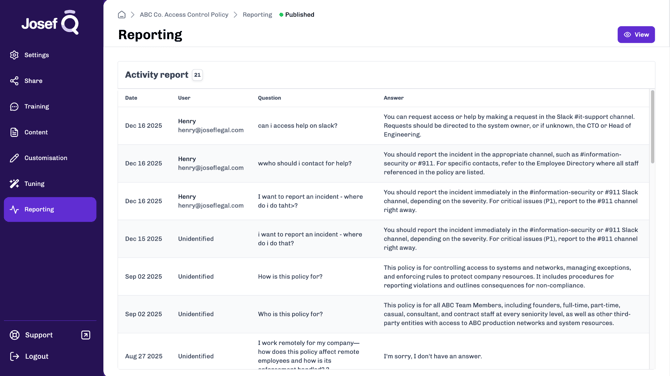
How to view user details
- Open your Josef Q tool.
- Go to the Reporting tab.
- Review the User column for each question.
When a question is asked from Microsoft Teams, the User column will display:
- The user’s Microsoft Teams display name
- The user’s Microsoft Teams email address
If a question is:
- Asked outside of Microsoft Teams, or
- Asked by a user without an identifiable Teams name or email
the User column will show “Unidentified”.